devtools/ 0000755 0001762 0000144 00000000000 13622573713 012122 5 ustar ligges users devtools/NAMESPACE 0000644 0001762 0000144 00000006340 13621537051 013336 0 ustar ligges users # Generated by roxygen2: do not edit by hand
S3method(format,check_results)
S3method(print,check_results)
S3method(print,dev_sitrep)
S3method(print,doctor)
S3method(print,maintainers)
export(as.package)
export(bash)
export(build)
export(build_manual)
export(build_readme)
export(build_site)
export(build_vignettes)
export(check)
export(check_built)
export(check_dep_version)
export(check_failures)
export(check_man)
export(check_rhub)
export(check_win_devel)
export(check_win_oldrelease)
export(check_win_release)
export(clean_dll)
export(clean_vignettes)
export(create)
export(dev_mode)
export(dev_package_deps)
export(dev_packages)
export(dev_sitrep)
export(devtest)
export(document)
export(dr_devtools)
export(dr_github)
export(find_rtools)
export(github_pat)
export(github_pull)
export(github_release)
export(has_devel)
export(has_tests)
export(inst)
export(install)
export(install_bioc)
export(install_bitbucket)
export(install_cran)
export(install_deps)
export(install_dev)
export(install_dev_deps)
export(install_git)
export(install_github)
export(install_gitlab)
export(install_local)
export(install_svn)
export(install_url)
export(install_version)
export(is.package)
export(lint)
export(load_all)
export(loaded_packages)
export(missing_s3)
export(package_file)
export(package_info)
export(parse_deps)
export(r_env_vars)
export(release)
export(release_checks)
export(reload)
export(revdep)
export(revdep_maintainers)
export(run_examples)
export(session_info)
export(show_news)
export(source_gist)
export(source_url)
export(spell_check)
export(submit_cran)
export(test)
export(test_coverage)
export(test_coverage_file)
export(test_file)
export(uninstall)
export(unload)
export(update_packages)
export(uses_testthat)
export(wd)
export(with_debug)
importFrom(cli,cat_bullet)
importFrom(cli,cat_rule)
importFrom(ellipsis,check_dots_used)
importFrom(memoise,memoise)
importFrom(pkgbuild,clean_dll)
importFrom(pkgbuild,find_rtools)
importFrom(pkgbuild,has_devel)
importFrom(pkgbuild,with_debug)
importFrom(pkgload,check_dep_version)
importFrom(pkgload,check_suggested)
importFrom(pkgload,inst)
importFrom(pkgload,parse_deps)
importFrom(pkgload,unload)
importFrom(remotes,dev_package_deps)
importFrom(remotes,github_pull)
importFrom(remotes,github_release)
importFrom(remotes,install_bioc)
importFrom(remotes,install_bitbucket)
importFrom(remotes,install_cran)
importFrom(remotes,install_dev)
importFrom(remotes,install_git)
importFrom(remotes,install_github)
importFrom(remotes,install_gitlab)
importFrom(remotes,install_local)
importFrom(remotes,install_svn)
importFrom(remotes,install_url)
importFrom(remotes,install_version)
importFrom(remotes,update_packages)
importFrom(sessioninfo,package_info)
importFrom(sessioninfo,session_info)
importFrom(stats,update)
importFrom(usethis,create_package)
importFrom(usethis,ui_code)
importFrom(usethis,ui_done)
importFrom(usethis,ui_field)
importFrom(usethis,ui_path)
importFrom(usethis,ui_todo)
importFrom(usethis,ui_value)
importFrom(usethis,use_test)
importFrom(utils,available.packages)
importFrom(utils,contrib.url)
importFrom(utils,install.packages)
importFrom(utils,installed.packages)
importFrom(utils,modifyList)
importFrom(utils,packageDescription)
importFrom(utils,packageVersion)
importFrom(utils,remove.packages)
importFrom(withr,defer)
devtools/README.md 0000644 0001762 0000144 00000020212 13542445754 013402 0 ustar ligges users # devtools
[](https://travis-ci.org/r-lib/devtools)
[](https://ci.appveyor.com/project/hadley/devtools)
[](https://codecov.io/github/r-lib/devtools?branch=master)

[](https://cran.r-project.org/package=devtools)
The aim of devtools is to make package development easier by providing R
functions that simplify and expedite common tasks. [R
Packages](http://r-pkgs.had.co.nz/) is a book based around this workflow.
## Installation
```r
# Install devtools from CRAN
install.packages("devtools")
# Or the development version from GitHub:
# install.packages("devtools")
devtools::install_github("r-lib/devtools")
```
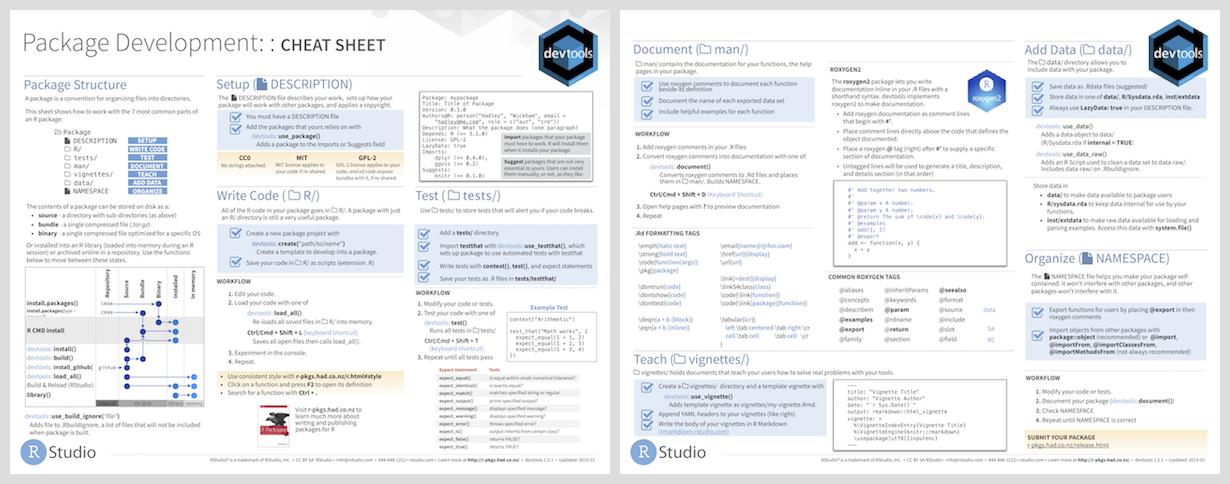
## Cheatsheet
## Usage
All devtools functions accept a path as an argument, e.g.
`load_all("path/to/mypkg")`. If you don't specify a path, devtools will
look in the current working directory - this is recommended practice.
### Frequent development tasks:
* `load_all()` simulates installing and reloading your package, loading R code
in `R/`, compiled shared objects in `src/` and data files in `data/`. During
development you usually want to access all functions (even un-exported
internal ones) so `load_all()` works as if all functions were exported in the
package `NAMESPACE`.
* `document()` updates generated documentation in `man/`, file collation and
`NAMESPACE`.
* `test()` reloads your code with `load_all()`, then runs all `testthat` tests.
* `test_coverage()` runs test coverage on your package with
[covr](https://github.com/r-lib/covr). This makes it easy to see what parts of your
package could use more tests!
### Building and installing:
* `install()` reinstalls the package, detaches the currently loaded version
then reloads the new version with `library()`. Reloading a package is not
guaranteed to work: see the documentation for `unload()` for caveats.
* `build()` builds a package file from package sources. You can use it to build
a binary version of your package.
* `install_*` functions install an R package:
* `install_github()` from GitHub
* `install_gitlab()` from GitLab
* `install_bitbucket()` from Bitbucket
* `install_url()` from an arbitrary url
* `install_git()` and `install_svn()` from an arbitrary git or SVN repository
* `install_local()` from a local file on disk
* `install_version()` from a specific version on CRAN
* `update_packages()` updates a package to the latest version. This works
both on packages installed from CRAN as well as those installed from any of
the `install_*` functions.
### Check and release:
* `check()` updates the documentation, then builds and checks the package locally.
`check_win()` checks a package using
[win-builder](http://win-builder.r-project.org/), and `check_rhub()` checks a package using
[r-hub](http://log.r-hub.io/). This allows you to easily check
your package on all systems CRAN uses before submission.
* `release()` makes sure everything is ok with your package (including asking
you a number of questions), then builds and uploads to CRAN.
## Learning more
R package development can be intimidating, however there are now a number of
valuable resources to help!
1. R Packages is a book that gives a comprehensive treatment of all common parts
of package development and uses devtools throughout.
* The first edition is available at , but note that
it has grown somewhat out of sync with the current version of devtools.
* A second edition is under development and is evolving to reflect the
current state of devtools. It is available at .
* The [Whole Game](http://r-pkgs.org/whole-game.html) and
[Package structure](http://r-pkgs.org/package-structure-state.html) chapters
make great places to start.
2. [RStudio community - package
development](https://community.rstudio.com/c/package-development)
is a great place to ask specific questions related to package development.
3. [rOpenSci packages](https://ropensci.github.io/dev_guide/) has
extensive documentation on best practices for R packages looking to be
contributed to rOpenSci, but also very useful general recommendations
for package authors.
4. There are a number of fantastic blog posts on writing your first package, including
- [Writing an R package from scratch - Hilary Parker](https://hilaryparker.com/2014/04/29/writing-an-r-package-from-scratch/)
- [How to develop good R packages - Maëlle Salmon](http://www.masalmon.eu/2017/12/11/goodrpackages/)
- [Making your first R package - Fong Chun Chan](http://tinyheero.github.io/jekyll/update/2015/07/26/making-your-first-R-package.html)
- [Writing an R package from scratch - Tomas Westlake](https://r-mageddon.netlify.com/post/writing-an-r-package-from-scratch/)
5. [Writing R
Extensions](https://cran.r-project.org/doc/manuals/r-release/R-exts.html) is
the exhaustive, canonical reference for writing R packages, maintained by
the R core developers.
## Conscious uncoupling
devtools started off as a lean-and-mean package to facilitate local package
development, but over the years it accumulated more and more functionality.
devtools has undergone a [conscious
uncoupling](https://web.archive.org/web/20140326060230/http://www.goop.com/journal/be/conscious-uncoupling)
to split out functionality into smaller, more tightly focussed packages. This
includes:
* [testthat](https://github.com/r-lib/testthat): Writing and running tests
(i.e. `test()`).
* [roxygen2](https://github.com/klutometis/roxygen): Function and package documentation
(i.e. `document()`).
* [remotes](https://github.com/r-lib/remotes): Installing packages (i.e.
`install_github()`).
* [pkgbuild](https://github.com/r-lib/pkgbuild): Building binary packages
(including checking if build tools are available) (i.e. `build()`).
* [pkgload](https://github.com/r-lib/pkgload): Simulating package loading (i.e.
`load_all()`).
* [rcmdcheck](https://github.com/r-lib/rcmdcheck): Running R CMD check and
reporting the results (i.e. `check()`).
* [revdepcheck](https://github.com/r-lib/revdepcheck): Running R CMD check on
all reverse dependencies, and figuring out what's changed since the last CRAN
release (i.e. `revdep_check()`).
* [sessioninfo](https://github.com/r-lib/sessioninfo): R session info (i.e.
`session_info()`).
* [usethis](https://github.com/r-lib/usethis): Automating package setup (i.e.
`use_test()`).
Generally, you should not need to worry about these different packages, because
devtools installs them all automatically. You will need to care, however, if
you're filing a bug because reporting it at the correct place will lead to a
speedier resolution.
You also may need to care if you are trying to use some devtools functionality
in your own package or deployed application. Generally in these cases it
is better to depend on the particular package directly rather than depend on devtools,
e.g. use `sessioninfo::session_info()` rather than `devtools::session_info()`,
or `remotes::install_github()` vs `devtools::install_github()`.
However for day to day development we recommend you continue to use
`library(devtools)` to quickly load all needed development tools, just like
`library(tidyverse)` quickly loads all the tools necessary for data exploration
and visualization.
## Code of conduct
Please note that the devtools project is released with a [Contributor Code of Conduct](https://github.com/r-lib/devtools/blob/master/.github/CODE_OF_CONDUCT.md). By contributing to this project, you agree to abide by its terms.
devtools/man/ 0000755 0001762 0000144 00000000000 13622522334 012666 5 ustar ligges users devtools/man/install.Rd 0000644 0001762 0000144 00000010022 13577154732 014632 0 ustar ligges users % Generated by roxygen2: do not edit by hand
% Please edit documentation in R/install.R
\name{install}
\alias{install}
\title{Install a local development package.}
\usage{
install(
pkg = ".",
reload = TRUE,
quick = FALSE,
build = !quick,
args = getOption("devtools.install.args"),
quiet = FALSE,
dependencies = NA,
upgrade = "ask",
build_vignettes = FALSE,
keep_source = getOption("keep.source.pkgs"),
force = FALSE,
...
)
}
\arguments{
\item{pkg}{The package to use, can be a file path to the package or a
package object. See \code{\link[=as.package]{as.package()}} for more information.}
\item{reload}{if \code{TRUE} (the default), will automatically reload the
package after installing.}
\item{quick}{if \code{TRUE} skips docs, multiple-architectures,
demos, and vignettes, to make installation as fast as possible.}
\item{build}{if \code{TRUE} \code{\link[pkgbuild:build]{pkgbuild::build()}}s the package first:
this ensures that the installation is completely clean, and prevents any
binary artefacts (like \file{.o}, \code{.so}) from appearing in your local
package directory, but is considerably slower, because every compile has
to start from scratch.}
\item{args}{An optional character vector of additional command line
arguments to be passed to \verb{R CMD INSTALL}. This defaults to the
value of the option \code{"devtools.install.args"}.}
\item{quiet}{If \code{TRUE}, suppress output.}
\item{dependencies}{Which dependencies do you want to check?
Can be a character vector (selecting from "Depends", "Imports",
"LinkingTo", "Suggests", or "Enhances"), or a logical vector.
\code{TRUE} is shorthand for "Depends", "Imports", "LinkingTo" and
"Suggests". \code{NA} is shorthand for "Depends", "Imports" and "LinkingTo"
and is the default. \code{FALSE} is shorthand for no dependencies (i.e.
just check this package, not its dependencies).}
\item{upgrade}{One of "default", "ask", "always", or "never". "default"
respects the value of the \code{R_REMOTES_UPGRADE} environment variable if set,
and falls back to "ask" if unset. "ask" prompts the user for which out of
date packages to upgrade. For non-interactive sessions "ask" is equivalent
to "always". \code{TRUE} and \code{FALSE} are also accepted and correspond to
"always" and "never" respectively.}
\item{build_vignettes}{if \code{TRUE}, will build vignettes. Normally it is
\code{build} that's responsible for creating vignettes; this argument makes
sure vignettes are built even if a build never happens (i.e. because
\code{build = FALSE}).}
\item{keep_source}{If \code{TRUE} will keep the srcrefs from an installed
package. This is useful for debugging (especially inside of RStudio).
It defaults to the option \code{"keep.source.pkgs"}.}
\item{force}{Force installation, even if the remote state has not changed
since the previous install.}
\item{...}{additional arguments passed to \code{\link[remotes:install_deps]{remotes::install_deps()}}
when installing dependencies.}
}
\description{
Uses \verb{R CMD INSTALL} to install the package. Will also try to install
dependencies of the package from CRAN, if they're not already installed.
}
\details{
If \code{quick = TRUE}, installation takes place using the current package
directory. If you have compiled code, this means that artefacts of
compilation will be created in the \verb{src/} directory. If you want to avoid
this, you can use \code{build = TRUE} to first build a package bundle and then
install it from a temporary directory. This is slower, but keeps the source
directory pristine.
If the package is loaded, it will be reloaded after installation. This is
not always completely possible, see \code{\link[=reload]{reload()}} for caveats.
To install a package in a non-default library, use \code{\link[withr:with_libpaths]{withr::with_libpaths()}}.
}
\seealso{
\code{\link[=update_packages]{update_packages()}} to update installed packages from the
source location and \code{\link[=with_debug]{with_debug()}} to install packages with
debugging flags set.
Other package installation:
\code{\link{uninstall}()}
}
\concept{package installation}
devtools/man/remote-reexports.Rd 0000644 0001762 0000144 00000014140 13622522334 016501 0 ustar ligges users % Generated by roxygen2: do not edit by hand
% Please edit documentation in R/remotes.R
\name{remote-reexports}
\alias{remote-reexports}
\alias{install_bioc}
\alias{install_bitbucket}
\alias{install_cran}
\alias{install_dev}
\alias{install_git}
\alias{install_github}
\alias{install_gitlab}
\alias{install_local}
\alias{install_svn}
\alias{install_url}
\alias{install_version}
\alias{update_packages}
\alias{dev_package_deps}
\title{Functions re-exported from the remotes package}
\usage{
install_bioc(
repo,
mirror = getOption("BioC_git", download_url("git.bioconductor.org/packages")),
git = c("auto", "git2r", "external"),
dependencies = NA,
upgrade = c("default", "ask", "always", "never"),
force = FALSE,
quiet = FALSE,
build = TRUE,
build_opts = c("--no-resave-data", "--no-manual", "--no-build-vignettes"),
build_manual = FALSE,
build_vignettes = FALSE,
repos = getOption("repos"),
type = getOption("pkgType"),
...
)
install_bitbucket(
repo,
ref = "master",
subdir = NULL,
auth_user = bitbucket_user(),
password = bitbucket_password(),
host = "api.bitbucket.org/2.0",
dependencies = NA,
upgrade = c("default", "ask", "always", "never"),
force = FALSE,
quiet = FALSE,
build = TRUE,
build_opts = c("--no-resave-data", "--no-manual", "--no-build-vignettes"),
build_manual = FALSE,
build_vignettes = FALSE,
repos = getOption("repos"),
type = getOption("pkgType"),
...
)
install_cran(
pkgs,
repos = getOption("repos"),
type = getOption("pkgType"),
dependencies = NA,
upgrade = c("default", "ask", "always", "never"),
force = FALSE,
quiet = FALSE,
build = TRUE,
build_opts = c("--no-resave-data", "--no-manual", "--no-build-vignettes"),
build_manual = FALSE,
build_vignettes = FALSE,
...
)
install_dev(package, cran_url = getOption("repos")[["CRAN"]], ...)
install_git(
url,
subdir = NULL,
ref = NULL,
branch = NULL,
credentials = git_credentials(),
git = c("auto", "git2r", "external"),
dependencies = NA,
upgrade = c("default", "ask", "always", "never"),
force = FALSE,
quiet = FALSE,
build = TRUE,
build_opts = c("--no-resave-data", "--no-manual", "--no-build-vignettes"),
build_manual = FALSE,
build_vignettes = FALSE,
repos = getOption("repos"),
type = getOption("pkgType"),
...
)
install_github(
repo,
ref = "master",
subdir = NULL,
auth_token = github_pat(quiet),
host = "api.github.com",
dependencies = NA,
upgrade = c("default", "ask", "always", "never"),
force = FALSE,
quiet = FALSE,
build = TRUE,
build_opts = c("--no-resave-data", "--no-manual", "--no-build-vignettes"),
build_manual = FALSE,
build_vignettes = FALSE,
repos = getOption("repos"),
type = getOption("pkgType"),
...
)
install_gitlab(
repo,
subdir = NULL,
auth_token = gitlab_pat(quiet),
host = "gitlab.com",
dependencies = NA,
upgrade = c("default", "ask", "always", "never"),
force = FALSE,
quiet = FALSE,
build = TRUE,
build_opts = c("--no-resave-data", "--no-manual", "--no-build-vignettes"),
build_manual = FALSE,
build_vignettes = FALSE,
repos = getOption("repos"),
type = getOption("pkgType"),
...
)
install_local(
path = ".",
subdir = NULL,
dependencies = NA,
upgrade = c("default", "ask", "always", "never"),
force = FALSE,
quiet = FALSE,
build = !is_binary_pkg(path),
build_opts = c("--no-resave-data", "--no-manual", "--no-build-vignettes"),
build_manual = FALSE,
build_vignettes = FALSE,
repos = getOption("repos"),
type = getOption("pkgType"),
...
)
install_svn(
url,
subdir = NULL,
args = character(0),
revision = NULL,
dependencies = NA,
upgrade = c("default", "ask", "always", "never"),
force = FALSE,
quiet = FALSE,
build = TRUE,
build_opts = c("--no-resave-data", "--no-manual", "--no-build-vignettes"),
build_manual = FALSE,
build_vignettes = FALSE,
repos = getOption("repos"),
type = getOption("pkgType"),
...
)
install_url(
url,
subdir = NULL,
dependencies = NA,
upgrade = c("default", "ask", "always", "never"),
force = FALSE,
quiet = FALSE,
build = TRUE,
build_opts = c("--no-resave-data", "--no-manual", "--no-build-vignettes"),
build_manual = FALSE,
build_vignettes = FALSE,
repos = getOption("repos"),
type = getOption("pkgType"),
...
)
install_version(
package,
version = NULL,
dependencies = NA,
upgrade = c("default", "ask", "always", "never"),
force = FALSE,
quiet = FALSE,
build = FALSE,
build_opts = c("--no-resave-data", "--no-manual", "--no-build-vignettes"),
build_manual = FALSE,
build_vignettes = FALSE,
repos = getOption("repos"),
type = "source",
...
)
update_packages(
packages = TRUE,
dependencies = NA,
upgrade = c("default", "ask", "always", "never"),
force = FALSE,
quiet = FALSE,
build = TRUE,
build_opts = c("--no-resave-data", "--no-manual", "--no-build-vignettes"),
build_manual = FALSE,
build_vignettes = FALSE,
repos = getOption("repos"),
type = getOption("pkgType"),
...
)
dev_package_deps(
pkgdir = ".",
dependencies = NA,
repos = getOption("repos"),
type = getOption("pkgType")
)
}
\description{
These functions are re-exported from the remotes package. They differ only
that the ones in devtools use the \link{ellipsis} package to ensure all dotted
arguments are used.
}
\details{
Follow the links below to see the documentation.
\code{\link[remotes:install_bioc]{remotes::install_bioc()}}, \code{\link[remotes:install_bitbucket]{remotes::install_bitbucket()}}, \code{\link[remotes:install_cran]{remotes::install_cran()}}, \code{\link[remotes:install_dev]{remotes::install_dev()}},
\code{\link[remotes:install_git]{remotes::install_git()}}, \code{\link[remotes:install_github]{remotes::install_github()}}, \code{\link[remotes:install_gitlab]{remotes::install_gitlab()}}, \code{\link[remotes:install_local]{remotes::install_local()}},
\code{\link[remotes:install_svn]{remotes::install_svn()}}, \code{\link[remotes:install_url]{remotes::install_url()}}, \code{\link[remotes:install_version]{remotes::install_version()}}, \code{\link[remotes:update_packages]{remotes::update_packages()}},
\code{\link[remotes:dev_package_deps]{remotes::dev_package_deps()}}.
}
\keyword{internal}
devtools/man/bash.Rd 0000644 0001762 0000144 00000000624 13536443710 014100 0 ustar ligges users % Generated by roxygen2: do not edit by hand
% Please edit documentation in R/bash.R
\name{bash}
\alias{bash}
\title{Open bash shell in package directory.}
\usage{
bash(pkg = ".")
}
\arguments{
\item{pkg}{The package to use, can be a file path to the package or a
package object. See \code{\link[=as.package]{as.package()}} for more information.}
}
\description{
Open bash shell in package directory.
}
devtools/man/as.package.Rd 0000644 0001762 0000144 00000001040 13532242644 015150 0 ustar ligges users % Generated by roxygen2: do not edit by hand
% Please edit documentation in R/package.R
\name{as.package}
\alias{as.package}
\title{Coerce input to a package.}
\usage{
as.package(x = NULL, create = NA)
}
\arguments{
\item{x}{object to coerce to a package}
\item{create}{only relevant if a package structure does not exist yet: if
\code{TRUE}, create a package structure; if \code{NA}, ask the user
(in interactive mode only)}
}
\description{
Possible specifications of package:
\itemize{
\item path
\item package object
}
}
\keyword{internal}
devtools/man/check_man.Rd 0000644 0001762 0000144 00000001432 13577154220 015071 0 ustar ligges users % Generated by roxygen2: do not edit by hand
% Please edit documentation in R/check-doc.R
\name{check_man}
\alias{check_man}
\title{Check documentation, as \verb{R CMD check} does.}
\usage{
check_man(pkg = ".")
}
\arguments{
\item{pkg}{The package to use, can be a file path to the package or a
package object. See \code{\link[=as.package]{as.package()}} for more information.}
}
\value{
Nothing. This function is called purely for it's side effects: if
}
\description{
This function attempts to run the documentation related checks in the
same way that \verb{R CMD check} does. Unfortunately it can't run them
all because some tests require the package to be loaded, and the way
they attempt to load the code conflicts with how devtools does it.
}
\examples{
\dontrun{
check_man("mypkg")
}
}
devtools/man/install_deps.Rd 0000644 0001762 0000144 00000005345 13622522334 015645 0 ustar ligges users % Generated by roxygen2: do not edit by hand
% Please edit documentation in R/install.R
\name{install_deps}
\alias{install_deps}
\alias{install_dev_deps}
\title{Install package dependencies if needed.}
\usage{
install_deps(
pkg = ".",
dependencies = NA,
repos = getOption("repos"),
type = getOption("pkgType"),
upgrade = c("default", "ask", "always", "never"),
quiet = FALSE,
build = TRUE,
build_opts = c("--no-resave-data", "--no-manual", " --no-build-vignettes"),
...
)
install_dev_deps(
pkg = ".",
dependencies = TRUE,
repos = getOption("repos"),
type = getOption("pkgType"),
upgrade = c("default", "ask", "always", "never"),
quiet = FALSE,
build = TRUE,
build_opts = c("--no-resave-data", "--no-manual", " --no-build-vignettes"),
...
)
}
\arguments{
\item{pkg}{The package to use, can be a file path to the package or a
package object. See \code{\link[=as.package]{as.package()}} for more information.}
\item{dependencies}{Which dependencies do you want to check?
Can be a character vector (selecting from "Depends", "Imports",
"LinkingTo", "Suggests", or "Enhances"), or a logical vector.
\code{TRUE} is shorthand for "Depends", "Imports", "LinkingTo" and
"Suggests". \code{NA} is shorthand for "Depends", "Imports" and "LinkingTo"
and is the default. \code{FALSE} is shorthand for no dependencies (i.e.
just check this package, not its dependencies).}
\item{repos}{A character vector giving repositories to use.}
\item{type}{Type of package to \code{update}.}
\item{upgrade}{One of "default", "ask", "always", or "never". "default"
respects the value of the \code{R_REMOTES_UPGRADE} environment variable if set,
and falls back to "ask" if unset. "ask" prompts the user for which out of
date packages to upgrade. For non-interactive sessions "ask" is equivalent
to "always". \code{TRUE} and \code{FALSE} are also accepted and correspond to
"always" and "never" respectively.}
\item{quiet}{If \code{TRUE}, suppress output.}
\item{build}{if \code{TRUE} \code{\link[pkgbuild:build]{pkgbuild::build()}}s the package first:
this ensures that the installation is completely clean, and prevents any
binary artefacts (like \file{.o}, \code{.so}) from appearing in your local
package directory, but is considerably slower, because every compile has
to start from scratch.}
\item{build_opts}{Options to pass to \verb{R CMD build}, only used when \code{build}}
\item{...}{additional arguments passed to \code{\link[remotes:install_deps]{remotes::install_deps()}}
when installing dependencies.}
}
\description{
\code{install_deps()} will install the
user dependencies needed to run the package, \code{install_dev_deps()} will also
install the development dependencies needed to test and build the package.
}
\examples{
\dontrun{install_deps(".")}
}
devtools/man/submit_cran.Rd 0000644 0001762 0000144 00000001556 13577154220 015476 0 ustar ligges users % Generated by roxygen2: do not edit by hand
% Please edit documentation in R/release.R
\name{submit_cran}
\alias{submit_cran}
\title{Submit a package to CRAN.}
\usage{
submit_cran(pkg = ".", args = NULL)
}
\arguments{
\item{pkg}{The package to use, can be a file path to the package or a
package object. See \code{\link[=as.package]{as.package()}} for more information.}
\item{args}{An optional character vector of additional command
line arguments to be passed to \verb{R CMD build}.}
}
\description{
This uses the new CRAN web-form submission process. After submission, you
will receive an email asking you to confirm submission - this is used
to check that the package is submitted by the maintainer.
}
\details{
It's recommended that you use \code{\link[=release]{release()}} rather than this
function as it performs more checks prior to submission.
}
\keyword{internal}
devtools/man/package_file.Rd 0000644 0001762 0000144 00000001141 13532242644 015547 0 ustar ligges users % Generated by roxygen2: do not edit by hand
% Please edit documentation in R/package.R
\name{package_file}
\alias{package_file}
\title{Find file in a package.}
\usage{
package_file(..., path = ".")
}
\arguments{
\item{...}{Components of the path.}
\item{path}{Place to start search for package directory.}
}
\description{
It always starts by walking up the path until it finds the root directory,
i.e. a directory containing \code{DESCRIPTION}. If it cannot find the root
directory, or it can't find the specified path, it will throw an error.
}
\examples{
\dontrun{
package_file("figures", "figure_1")
}
}
devtools/man/check_rhub.Rd 0000644 0001762 0000144 00000003662 13577154220 015265 0 ustar ligges users % Generated by roxygen2: do not edit by hand
% Please edit documentation in R/r-hub.R
\name{check_rhub}
\alias{check_rhub}
\title{Run CRAN checks for package on R-hub}
\usage{
check_rhub(
pkg = ".",
platforms = NULL,
email = NULL,
interactive = TRUE,
build_args = NULL,
...
)
}
\arguments{
\item{pkg}{The package to use, can be a file path to the package or a
package object. See \code{\link[=as.package]{as.package()}} for more information.}
\item{platforms}{R-hub platforms to run the check on. If \code{NULL}
uses default list of CRAN checkers (one for each major platform, and
one with extra checks if you have compiled code). You can also specify
your own, see \code{\link[rhub:platforms]{rhub::platforms()}} for a complete list.}
\item{email}{email address to notify, defaults to the maintainer
address in the package.}
\item{interactive}{whether to show the status of the build
interactively. R-hub will send an email to the package maintainer's
email address, regardless of whether the check is interactive or not.}
\item{build_args}{Arguments passed to \verb{R CMD build}}
\item{...}{extra arguments, passed to \code{\link[rhub:check_for_cran]{rhub::check_for_cran()}}.}
}
\value{
a \code{rhub_check} object.
}
\description{
It runs \code{\link[=build]{build()}} on the package, with the arguments specified
in \code{args}, and then submits it to the R-hub builder at
\url{https://builder.r-hub.io}. The \code{interactive} option controls
whether the function waits for the check output. Regardless, after the
check is complete, R-hub sends an email with the results to the package
maintainer.
}
\section{About email validation on r-hub}{
To build and check R packages on R-hub, you need to validate your
email address. This is because R-hub sends out emails about build
results. See more at \code{\link[rhub:validate_email]{rhub::validate_email()}}.
}
\seealso{
Other build functions:
\code{\link{check_win}()}
}
\concept{build functions}
devtools/man/git_checks.Rd 0000644 0001762 0000144 00000000772 13536443710 015272 0 ustar ligges users % Generated by roxygen2: do not edit by hand
% Please edit documentation in R/check-git.R
\name{git_checks}
\alias{git_checks}
\title{Git checks.}
\usage{
git_checks(pkg = ".")
}
\arguments{
\item{pkg}{The package to use, can be a file path to the package or a
package object. See \code{\link[=as.package]{as.package()}} for more information.}
}
\description{
This function performs Git checks checks prior to release. It is called
automatically by \code{\link[=release]{release()}}.
}
\keyword{internal}
devtools/man/build_site.Rd 0000644 0001762 0000144 00000001142 13532242644 015301 0 ustar ligges users % Generated by roxygen2: do not edit by hand
% Please edit documentation in R/build-site.R
\name{build_site}
\alias{build_site}
\title{Execute \pkg{pkgdown} build_site in a package}
\usage{
build_site(path = ".", quiet = TRUE, ...)
}
\arguments{
\item{path}{path to the package to build the static HTML.}
\item{quiet}{If \code{TRUE}, suppress output.}
\item{...}{additional arguments passed to \code{\link[pkgdown:build_site]{pkgdown::build_site()}}}
}
\description{
\code{build_site()} is a shortcut for \code{\link[pkgdown:build_site]{pkgdown::build_site()}}, it generates the
static HTML documentation.
}
devtools/man/revdep.Rd 0000644 0001762 0000144 00000002750 13577154220 014452 0 ustar ligges users % Generated by roxygen2: do not edit by hand
% Please edit documentation in R/revdep.R
\name{revdep}
\alias{revdep}
\alias{revdep_maintainers}
\title{Reverse dependency tools.}
\usage{
revdep(
pkg,
dependencies = c("Depends", "Imports", "Suggests", "LinkingTo"),
recursive = FALSE,
ignore = NULL,
bioconductor = FALSE
)
revdep_maintainers(pkg = ".")
}
\arguments{
\item{pkg}{Package name. This is unlike most devtools packages which
take a path because you might want to determine dependencies for a package
that you don't have installed. If omitted, defaults to the name of the
current package.}
\item{dependencies}{A character vector listing the types of dependencies
to follow.}
\item{recursive}{If \code{TRUE} look for full set of recursive dependencies.}
\item{ignore}{A character vector of package names to ignore. These packages
will not appear in returned vector.}
\item{bioconductor}{If \code{TRUE} also look for dependencies amongst
Bioconductor packages.}
}
\description{
Tools to check and notify maintainers of all CRAN and Bioconductor
packages that depend on the specified package.
}
\details{
The first run in a session will be time-consuming because it must download
all package metadata from CRAN and Bioconductor. Subsequent runs will
be faster.
}
\examples{
\dontrun{
revdep("ggplot2")
revdep("ggplot2", ignore = c("xkcd", "zoo"))
}
}
\seealso{
The \href{https://github.com/r-lib/revdepcheck}{revdepcheck} package can
be used to run R CMD check on all reverse dependencies.
}
devtools/man/devtools-deprecated.Rd 0000644 0001762 0000144 00000000640 13536443710 017116 0 ustar ligges users % Generated by roxygen2: do not edit by hand
% Please edit documentation in R/sitrep.R, R/zzz.R
\name{dr_devtools}
\alias{dr_devtools}
\alias{dr_github}
\alias{devtools-deprecated}
\title{Deprecated Functions}
\usage{
dr_devtools()
dr_github(path = ".")
}
\description{
These functions are Deprecated in this release of devtools, they will be
marked as Defunct and removed in a future version.
}
\keyword{internal}
devtools/man/devtest.Rd 0000644 0001762 0000144 00000000711 13532242644 014635 0 ustar ligges users % Generated by roxygen2: do not edit by hand
% Please edit documentation in R/test.R
\name{devtest}
\alias{devtest}
\title{Return the path to one of the packages in the devtools test dir}
\usage{
devtest(package)
}
\arguments{
\item{package}{Name of the test package.}
}
\description{
Devtools comes with some simple packages for testing. This function
returns the path to them.
}
\examples{
if (has_tests()) {
devtest("testUseData")
}
}
\keyword{internal}
devtools/man/clean_vignettes.Rd 0000644 0001762 0000144 00000001005 13536443710 016327 0 ustar ligges users % Generated by roxygen2: do not edit by hand
% Please edit documentation in R/vignettes.R
\name{clean_vignettes}
\alias{clean_vignettes}
\title{Clean built vignettes.}
\usage{
clean_vignettes(pkg = ".")
}
\arguments{
\item{pkg}{The package to use, can be a file path to the package or a
package object. See \code{\link[=as.package]{as.package()}} for more information.}
}
\description{
This uses a fairly rudimentary algorithm where any files in \file{doc}
with a name that exists in \file{vignettes} are removed.
}
devtools/man/is.package.Rd 0000644 0001762 0000144 00000000362 13532242644 015166 0 ustar ligges users % Generated by roxygen2: do not edit by hand
% Please edit documentation in R/package.R
\name{is.package}
\alias{is.package}
\title{Is the object a package?}
\usage{
is.package(x)
}
\description{
Is the object a package?
}
\keyword{internal}
devtools/man/source_url.Rd 0000644 0001762 0000144 00000002726 13532242644 015351 0 ustar ligges users % Generated by roxygen2: do not edit by hand
% Please edit documentation in R/run-source.R
\name{source_url}
\alias{source_url}
\title{Run a script through some protocols such as http, https, ftp, etc.}
\usage{
source_url(url, ..., sha1 = NULL)
}
\arguments{
\item{url}{url}
\item{...}{other options passed to \code{\link[=source]{source()}}}
\item{sha1}{The (prefix of the) SHA-1 hash of the file at the remote URL.}
}
\description{
If a SHA-1 hash is specified with the \code{sha1} argument, then this
function will check the SHA-1 hash of the downloaded file to make sure it
matches the expected value, and throw an error if it does not match. If the
SHA-1 hash is not specified, it will print a message displaying the hash of
the downloaded file. The purpose of this is to improve security when running
remotely-hosted code; if you have a hash of the file, you can be sure that
it has not changed. For convenience, it is possible to use a truncated SHA1
hash, down to 6 characters, but keep in mind that a truncated hash won't be
as secure as the full hash.
}
\examples{
\dontrun{
source_url("https://gist.github.com/hadley/6872663/raw/hi.r")
# With a hash, to make sure the remote file hasn't changed
source_url("https://gist.github.com/hadley/6872663/raw/hi.r",
sha1 = "54f1db27e60bb7e0486d785604909b49e8fef9f9")
# With a truncated hash
source_url("https://gist.github.com/hadley/6872663/raw/hi.r",
sha1 = "54f1db27e60")
}
}
\seealso{
\code{\link[=source_gist]{source_gist()}}
}
devtools/man/lint.Rd 0000644 0001762 0000144 00000002136 13577154220 014131 0 ustar ligges users % Generated by roxygen2: do not edit by hand
% Please edit documentation in R/lint.R
\name{lint}
\alias{lint}
\title{Lint all source files in a package.}
\usage{
lint(pkg = ".", cache = TRUE, ...)
}
\arguments{
\item{pkg}{The package to use, can be a file path to the package or a
package object. See \code{\link[=as.package]{as.package()}} for more information.}
\item{cache}{store the lint results so repeated lints of the same content
use the previous results.}
\item{...}{additional arguments passed to \code{\link[lintr:lint_package]{lintr::lint_package()}}}
}
\description{
The default linters correspond to the style guide at
\url{http://r-pkgs.had.co.nz/r.html#style}, however it is possible to
override any or all of them using the \code{linters} parameter.
}
\details{
The lintr cache is by default stored in \verb{~/.R/lintr_cache/} (this can
be configured by setting \code{options(lintr.cache_directory)}). It can be
cleared by calling \code{\link[lintr:clear_cache]{lintr::clear_cache()}}.
}
\seealso{
\code{\link[lintr:lint_package]{lintr::lint_package()}}, \code{\link[lintr:lint]{lintr::lint()}}
}
devtools/man/dev_mode.Rd 0000644 0001762 0000144 00000001501 13532242644 014737 0 ustar ligges users % Generated by roxygen2: do not edit by hand
% Please edit documentation in R/dev-mode.R
\name{dev_mode}
\alias{dev_mode}
\title{Activate and deactivate development mode.}
\usage{
dev_mode(on = NULL, path = getOption("devtools.path"))
}
\arguments{
\item{on}{turn dev mode on (\code{TRUE}) or off (\code{FALSE}). If omitted
will guess based on whether or not \code{path} is in
\code{\link[=.libPaths]{.libPaths()}}}
\item{path}{directory to library.}
}
\description{
When activated, \code{dev_mode} creates a new library for storing installed
packages. This new library is automatically created when \code{dev_mode} is
activated if it does not already exist.
This allows you to test development packages in a sandbox, without
interfering with the other packages you have installed.
}
\examples{
\dontrun{
dev_mode()
dev_mode()
}
}
devtools/man/check.Rd 0000644 0001762 0000144 00000011425 13577154220 014241 0 ustar ligges users % Generated by roxygen2: do not edit by hand
% Please edit documentation in R/check.R
\name{check}
\alias{check}
\alias{check_built}
\title{Build and check a package, cleaning up automatically on success.}
\usage{
check(
pkg = ".",
document = NA,
build_args = NULL,
...,
manual = FALSE,
cran = TRUE,
remote = FALSE,
incoming = remote,
force_suggests = FALSE,
run_dont_test = FALSE,
args = "--timings",
env_vars = c(NOT_CRAN = "true"),
quiet = FALSE,
check_dir = tempdir(),
cleanup = TRUE,
vignettes = TRUE,
error_on = c("never", "error", "warning", "note")
)
check_built(
path = NULL,
cran = TRUE,
remote = FALSE,
incoming = remote,
force_suggests = FALSE,
run_dont_test = FALSE,
manual = FALSE,
args = "--timings",
env_vars = NULL,
check_dir = tempdir(),
quiet = FALSE,
error_on = c("never", "error", "warning", "note")
)
}
\arguments{
\item{pkg}{The package to use, can be a file path to the package or a
package object. See \code{\link[=as.package]{as.package()}} for more information.}
\item{document}{If \code{NA} and the package uses roxygen2, will
rerun \code{\link[=document]{document()}} prior to checking. Use \code{TRUE}
and \code{FALSE} to override this default.}
\item{build_args}{Additional arguments passed to \verb{R CMD build}}
\item{...}{Additional arguments passed on to \code{\link[pkgbuild:build]{pkgbuild::build()}}.}
\item{manual}{If \code{FALSE}, don't build and check manual
(\code{--no-manual}).}
\item{cran}{if \code{TRUE} (the default), check using the same settings as
CRAN uses.}
\item{remote}{Sets \verb{_R_CHECK_CRAN_INCOMING_REMOTE_} env var.
If \code{TRUE}, performs a number of CRAN incoming checks that require
remote access.}
\item{incoming}{Sets \verb{_R_CHECK_CRAN_INCOMING_} env var.
If \code{TRUE}, performs a number of CRAN incoming checks.}
\item{force_suggests}{Sets \verb{_R_CHECK_FORCE_SUGGESTS_}. If
\code{FALSE} (the default), check will proceed even if all suggested
packages aren't found.}
\item{run_dont_test}{Sets \code{--run-donttest} so that tests surrounded in
\code{\\dontest\{\}} are also tested. This is important for CRAN
submission.}
\item{args}{Additional arguments passed to \verb{R CMD check}}
\item{env_vars}{Environment variables set during \verb{R CMD check}}
\item{quiet}{if \code{TRUE} suppresses output from this function.}
\item{check_dir}{the directory in which the package is checked
compatibility. \code{args = "--output=/foo/bar"} can be used to change the
check directory.}
\item{cleanup}{Deprecated.}
\item{vignettes}{If \code{FALSE}, do not build or check vignettes, equivalent to
using \verb{args = '--ignore-vignettes' and }build_args = '--no-build-vignettes'.}
\item{error_on}{Whether to throw an error on \code{R CMD check} failures.
Note that the check is always completed (unless a timeout happens),
and the error is only thrown after completion. If \code{"never"}, then
no errors are thrown. If \code{"error"}, then only \code{ERROR} failures
generate errors. If \code{"warning"}, then \code{WARNING} failures generate
errors as well. If \code{"note"}, then any check failure generated an
error.}
\item{path}{Path to built package.}
}
\value{
An object containing errors, warnings, and notes.
}
\description{
\code{check} automatically builds and checks a source package, using all
known best practices. \code{check_built} checks an already built package.
}
\details{
Passing \verb{R CMD check} is essential if you want to submit your package
to CRAN: you must not have any ERRORs or WARNINGs, and you want to ensure
that there are as few NOTEs as possible. If you are not submitting to CRAN,
at least ensure that there are no ERRORs or WARNINGs: these typically
represent serious problems.
\code{check} automatically builds a package before calling \code{check_built}
as this is the recommended way to check packages. Note that this process
runs in an independent realisation of R, so nothing in your current
workspace will affect the process.
}
\section{Environment variables}{
Devtools does its best to set up an environment that combines best practices
with how check works on CRAN. This includes:
\itemize{
\item The standard environment variables set by devtools:
\code{\link[=r_env_vars]{r_env_vars()}}. Of particular note for package tests is the
\code{NOT_CRAN} env var which lets you know that your tests are not
running on CRAN, and hence can take a reasonable amount of time.
\item Debugging flags for the compiler, set by
\code{\link{compiler_flags}(FALSE)}.
\item If \code{aspell} is found \verb{_R_CHECK_CRAN_INCOMING_USE_ASPELL_}
is set to \code{TRUE}. If no spell checker is installed, a warning is
issued.)
\item env vars set by arguments \code{incoming}, \code{remote} and
\code{force_suggests}
}
}
\seealso{
\code{\link[=release]{release()}} if you want to send the checked package to
CRAN.
}
devtools/man/spell_check.Rd 0000644 0001762 0000144 00000001411 13536443710 015432 0 ustar ligges users % Generated by roxygen2: do not edit by hand
% Please edit documentation in R/spell-check.R
\name{spell_check}
\alias{spell_check}
\title{Spell checking}
\usage{
spell_check(pkg = ".", vignettes = TRUE, use_wordlist = TRUE)
}
\arguments{
\item{pkg}{The package to use, can be a file path to the package or a
package object. See \code{\link[=as.package]{as.package()}} for more information.}
\item{vignettes}{also check all \code{rmd} and \code{rnw} files in the pkg \code{vignettes} folder}
\item{use_wordlist}{ignore words in the package \link[spelling:get_wordlist]{WORDLIST} file}
}
\description{
Runs a spell check on text fields in the package description file, manual
pages, and optionally vignettes. Wraps the \link[spelling:spell_check_package]{spelling}
package.
}
devtools/man/release.Rd 0000644 0001762 0000144 00000003230 13577154220 014577 0 ustar ligges users % Generated by roxygen2: do not edit by hand
% Please edit documentation in R/release.R
\name{release}
\alias{release}
\title{Release package to CRAN.}
\usage{
release(pkg = ".", check = FALSE, args = NULL)
}
\arguments{
\item{pkg}{The package to use, can be a file path to the package or a
package object. See \code{\link[=as.package]{as.package()}} for more information.}
\item{check}{if \code{TRUE}, run checking, otherwise omit it. This
is useful if you've just checked your package and you're ready to
release it.}
\item{args}{An optional character vector of additional command
line arguments to be passed to \verb{R CMD build}.}
}
\description{
Run automated and manual tests, then post package to CRAN.
}
\details{
The package release process will:
\itemize{
\item Confirm that the package passes \verb{R CMD check} on relevant platforms
\item Confirm that important files are up-to-date
\item Build the package
\item Submit the package to CRAN, using comments in "cran-comments.md"
}
You can add arbitrary extra questions by defining an (un-exported) function
called \code{release_questions()} that returns a character vector
of additional questions to ask.
You also need to read the CRAN repository policy at
\url{https://cran.r-project.org/web/packages/policies.html} and make
sure you're in line with the policies. \code{release} tries to automate as
many of polices as possible, but it's impossible to be completely
comprehensive, and they do change in between releases of devtools.
}
\seealso{
\code{\link[usethis:use_release_issue]{usethis::use_release_issue()}} to create a checklist of release
tasks that you can use in addition to or in place of \code{release}.
}
devtools/man/build_vignettes.Rd 0000644 0001762 0000144 00000005323 13577154220 016353 0 ustar ligges users % Generated by roxygen2: do not edit by hand
% Please edit documentation in R/vignettes.R
\name{build_vignettes}
\alias{build_vignettes}
\title{Build package vignettes.}
\usage{
build_vignettes(
pkg = ".",
dependencies = "VignetteBuilder",
clean = TRUE,
upgrade = "never",
quiet = TRUE,
install = TRUE,
keep_md = TRUE
)
}
\arguments{
\item{pkg}{The package to use, can be a file path to the package or a
package object. See \code{\link[=as.package]{as.package()}} for more information.}
\item{dependencies}{Which dependencies do you want to check?
Can be a character vector (selecting from "Depends", "Imports",
"LinkingTo", "Suggests", or "Enhances"), or a logical vector.
\code{TRUE} is shorthand for "Depends", "Imports", "LinkingTo" and
"Suggests". \code{NA} is shorthand for "Depends", "Imports" and "LinkingTo"
and is the default. \code{FALSE} is shorthand for no dependencies (i.e.
just check this package, not its dependencies).}
\item{clean}{Remove all files generated by the build, even if there
were copies there before.}
\item{upgrade}{One of "default", "ask", "always", or "never". "default"
respects the value of the \code{R_REMOTES_UPGRADE} environment variable if set,
and falls back to "ask" if unset. "ask" prompts the user for which out of
date packages to upgrade. For non-interactive sessions "ask" is equivalent
to "always". \code{TRUE} and \code{FALSE} are also accepted and correspond to
"always" and "never" respectively.}
\item{quiet}{If \code{TRUE}, suppresses most output. Set to \code{FALSE}
if you need to debug.}
\item{install}{If \code{TRUE}, install the package before building
vignettes.}
\item{keep_md}{If \code{TRUE}, move md intermediates as well as rendered
outputs. Most useful when using the \code{keep_md} YAML option for Rmarkdown
outputs. See
\url{https://bookdown.org/yihui/rmarkdown/html-document.html#keeping-markdown}.}
}
\description{
Builds package vignettes using the same algorithm that \verb{R CMD build}
does. This means including non-Sweave vignettes, using makefiles (if
present), and copying over extra files. The files are copied in the 'doc'
directory and an vignette index is created in 'Meta/vignette.rds', as they
would be in a built package. 'doc' and 'Meta' are added to
\code{.Rbuildignore}, so will not be included in the built package. These
files can be checked into version control, so they can be viewed with
\code{browseVignettes()} and \code{vignette()} if the package has been
loaded with \code{load_all()} without needing to re-build them locally.
}
\seealso{
\code{\link[=clean_vignettes]{clean_vignettes()}} to remove the pdfs in
\file{doc} created from vignettes
\code{\link[=clean_vignettes]{clean_vignettes()}} to remove build tex/pdf files.
}
\keyword{programming}
devtools/man/check_win.Rd 0000644 0001762 0000144 00000004116 13577154220 015115 0 ustar ligges users % Generated by roxygen2: do not edit by hand
% Please edit documentation in R/check-win.R
\name{check_win}
\alias{check_win}
\alias{check_win_devel}
\alias{check_win_release}
\alias{check_win_oldrelease}
\title{Build windows binary package.}
\usage{
check_win_devel(
pkg = ".",
args = NULL,
manual = TRUE,
email = NULL,
quiet = FALSE,
...
)
check_win_release(
pkg = ".",
args = NULL,
manual = TRUE,
email = NULL,
quiet = FALSE,
...
)
check_win_oldrelease(
pkg = ".",
args = NULL,
manual = TRUE,
email = NULL,
quiet = FALSE,
...
)
}
\arguments{
\item{pkg}{The package to use, can be a file path to the package or a
package object. See \code{\link[=as.package]{as.package()}} for more information.}
\item{args}{An optional character vector of additional command
line arguments to be passed to \code{R CMD build} if \code{binary = FALSE},
or \code{R CMD install} if \code{binary = TRUE}.}
\item{manual}{For source packages: if \code{FALSE}, don't build PDF
vignettes (\code{--no-build-vignettes}) or manual (\code{--no-manual}).}
\item{email}{An alternative email to use, default \code{NULL} uses the package
Maintainer's email.}
\item{quiet}{If \code{TRUE}, suppresses output.}
\item{...}{Additional arguments passed to \code{\link[pkgbuild:build]{pkgbuild::build()}}.}
}
\description{
This function works by bundling source package, and then uploading to
\url{https://win-builder.r-project.org/}. Once building is complete you'll
receive a link to the built package in the email address listed in the
maintainer field. It usually takes around 30 minutes. As a side effect,
win-build also runs \verb{R CMD check} on the package, so \code{check_win}
is also useful to check that your package is ok on windows.
}
\section{Functions}{
\itemize{
\item \code{check_win_devel}: Check package on the development version of R.
\item \code{check_win_release}: Check package on the release version of R.
\item \code{check_win_oldrelease}: Check package on the previous major release version of R.
}}
\seealso{
Other build functions:
\code{\link{check_rhub}()}
}
\concept{build functions}
devtools/man/document.Rd 0000644 0001762 0000144 00000001735 13577154220 015005 0 ustar ligges users % Generated by roxygen2: do not edit by hand
% Please edit documentation in R/document.R
\name{document}
\alias{document}
\title{Use roxygen to document a package.}
\usage{
document(pkg = ".", roclets = NULL, quiet = FALSE)
}
\arguments{
\item{pkg}{The package to use, can be a file path to the package or a
package object. See \code{\link[=as.package]{as.package()}} for more information.}
\item{roclets}{Character vector of roclet names to use with package.
The default, \code{NULL}, uses the roxygen \code{roclets} option,
which defaults to \code{c("collate", "namespace", "rd")}.}
\item{quiet}{if \code{TRUE} suppresses output from this function.}
}
\description{
This function is a wrapper for the \code{\link[roxygen2:roxygenize]{roxygen2::roxygenize()}}
function from the roxygen2 package. See the documentation and vignettes of
that package to learn how to use roxygen.
}
\seealso{
\code{\link[roxygen2:roxygenize]{roxygen2::roxygenize()}},
\code{browseVignettes("roxygen2")}
}
devtools/man/has_tests.Rd 0000644 0001762 0000144 00000000404 13532242644 015153 0 ustar ligges users % Generated by roxygen2: do not edit by hand
% Please edit documentation in R/has-tests.R
\name{has_tests}
\alias{has_tests}
\title{Was devtools installed with tests?}
\usage{
has_tests()
}
\description{
Was devtools installed with tests?
}
\keyword{internal}
devtools/man/missing_s3.Rd 0000644 0001762 0000144 00000000701 13536443710 015235 0 ustar ligges users % Generated by roxygen2: do not edit by hand
% Please edit documentation in R/missing-s3.R
\name{missing_s3}
\alias{missing_s3}
\title{Find missing s3 exports.}
\usage{
missing_s3(pkg = ".")
}
\arguments{
\item{pkg}{The package to use, can be a file path to the package or a
package object. See \code{\link[=as.package]{as.package()}} for more information.}
}
\description{
The method is heuristic - looking for objs with a period in their name.
}
devtools/man/dev_sitrep.Rd 0000644 0001762 0000144 00000002133 13536443710 015324 0 ustar ligges users % Generated by roxygen2: do not edit by hand
% Please edit documentation in R/sitrep.R
\name{dev_sitrep}
\alias{dev_sitrep}
\title{Report package development situation}
\usage{
dev_sitrep(pkg = ".", debug = FALSE)
}
\arguments{
\item{pkg}{The package to use, can be a file path to the package or a
package object. See \code{\link[=as.package]{as.package()}} for more information.}
\item{debug}{If \code{TRUE}, will print out extra information useful for
debugging. If \code{FALSE}, it will use result cached from a previous run.}
}
\value{
A named list, with S3 class \code{dev_sitrep} (for printing purposes).
}
\description{
\code{dev_sitrep()} reports
\itemize{
\item If R is up to date
\item If RStudio is up to date
\item If compiler build tools are installed and available for use
\item If devtools and its dependencies are up to date
\item If the package's dependencies are up to date
}
Call this function if things seem weird and you're not sure
what's wrong or how to fix it. If this function returns no output
everything should be ready for package development.
}
\examples{
\dontrun{
dev_sitrep()
}
}
devtools/man/figures/ 0000755 0001762 0000144 00000000000 13536443710 014336 5 ustar ligges users devtools/man/figures/logo.svg 0000644 0001762 0000144 00000016235 13536443710 016026 0 ustar ligges users
